 YTVidHub
Bulk YouTube Subtitle Downloader
Extract subtitles from playlists, channels, and multiple videos in one flow. Export clean SRT, VTT, and TXT files for editing, translation, accessibility review, transcript libraries, and archive work.
Use it when one-by-one downloads are too slow: paste a playlist, channel, or list of videos and keep every subtitle file in one organized package.
Single video, playlist, or channel URL — one per line for bulk
Input Types
Video · Playlist · Channel
Output
SRT · VTT · Clean TXT
Delivery
One Organized ZIP Package
Quick Answer: Can you download subtitles from an entire YouTube playlist?
Yes. A playlist subtitle downloader extracts captions from every video in a YouTube playlist and packages the results as SRT, VTT, or clean TXT files. This is faster than opening each video manually, especially when you need captions for research, translation, accessibility checks, content repurposing, or long-term archives.
Bulk YouTube Subtitle Downloader for Playlists & Channels
A practical bulk YouTube subtitle downloader for anyone who needs repeatable subtitle exports without opening each video one by one.
Playlist & Channel Ingestion
Paste a playlist, channel, or multiple video URLs. The batch engine automatically expands and prepares all links.
High-Speed Batch Processing
Process large sets of videos in one workflow, so you avoid manual one-by-one subtitle downloads.
SRT, VTT, and Clean TXT
Export subtitle files for players, editors, translation review, archives, and readable transcript libraries.
Why Use a Bulk Subtitle Downloader?
Replace repetitive copy-paste operations with a single batch pipeline.
Manual Method
- Open many tabs and process videos one by one.
- Manually click subtitle download repeatedly.
- Spend time renaming and organizing files.
YTVidHub Batch Pipeline
- Paste playlist/channel URL once and run bulk extraction.
- Export SRT/VTT/TXT in one consistent package.
- Receive clean file names mapped to original titles.
| Task | Manual workflow | Bulk downloader workflow |
|---|---|---|
| Playlist captions | Open videos one by one and repeat the same download steps. | Paste the playlist URL once and export all available subtitles. |
| File organization | Rename downloaded files manually after each export. | Receive an organized ZIP with files mapped to video titles. |
| Output formats | Format support depends on the source interface. | Choose SRT, VTT, or TXT for the whole batch. |
Who Should Use Bulk Subtitle Extraction?
Bulk extraction is useful when the work is bigger than one video: playlists, channels, recurring research, course libraries, and repeated caption review.
Course teams
Download captions from a full lesson playlist and keep files named by video title.
Localization teams
Collect available language tracks before translation review or subtitle QA.
Researchers
Build a searchable transcript library from many public videos without opening each one manually.
Content teams
Turn channel or playlist captions into reusable notes, outlines, and editorial source material.
How to Download Subtitles from a YouTube Playlist
A clear flow from URL ingestion to final ZIP delivery.
Paste Sources
Add playlist, channel, or video links in one input area.
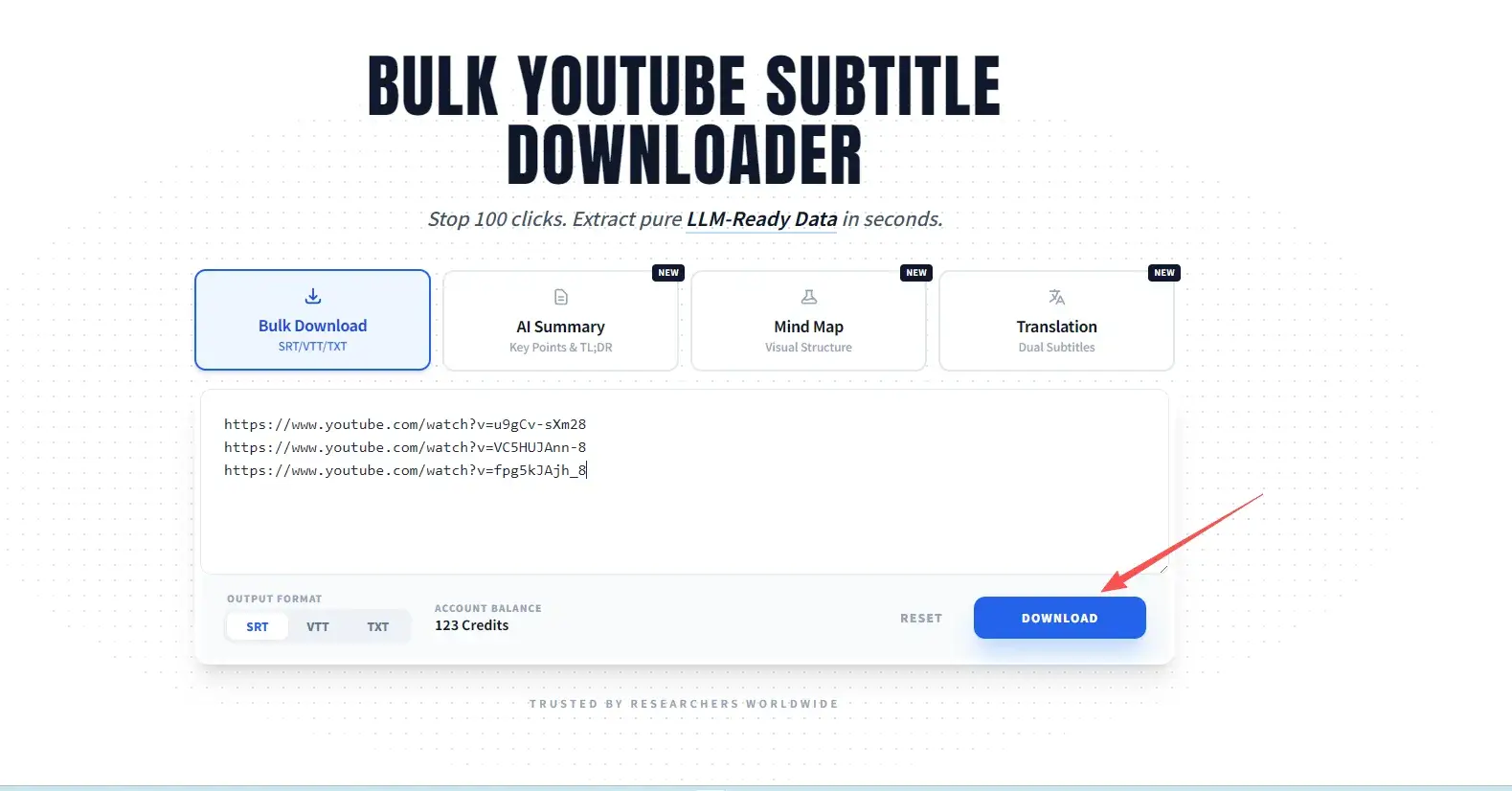
Choose Output Format
Select SRT, VTT, or Clean TXT based on your scenario.
Download Organized ZIP
Get one archive with clear file names mapped to video titles.
What You Get After a Bulk Download
The goal is not just extraction. The goal is a clean package that is easy to review, share, and reuse.
One ZIP package
Keep a full batch together instead of managing many separate browser downloads.
Clear file names
Map exported subtitle files back to source video titles so review work stays organized.
Consistent format
Apply SRT, VTT, or TXT across the whole batch instead of switching formats video by video.
Supported Formats: SRT, VTT, TXT for Batch Download
Choose the right format for playback, editing, or dataset use.
For reading & review
Clean TXT
Timestamp-free transcript text for reading, search, translation review, and notes.
Welcome to our deep dive into the future of media...
For Players & Editing
SRT / VTT
Timecoded subtitle files for upload, synchronization, and video production tools.
1 00:00:01,000 --> 00:00:04,000 Welcome to our deep dive...
FAQ About Bulk YouTube Subtitle Downloads
Everything important about bulk subtitle extraction.
What is a bulk YouTube subtitle downloader?
It is a YouTube subtitle extractor that downloads subtitles from multiple videos, playlists, and channels in one batch workflow instead of manual one-by-one processing.
Do I need to log in or register?
No sign-up is required to get started with bulk subtitle extraction. You can run your first batch directly and export subtitle files quickly.
Can I download subtitles from playlists and channels?
Yes. The tool supports playlist and channel ingestion so you can extract subtitles at scale from grouped video sources.
Which formats are supported for export?
You can export SRT, VTT, and clean TXT formats. This makes it easy to integrate subtitles into playback, editing, translation, review, and archive workflows.
Does it support multilingual subtitle collection?
Yes. You can collect multilingual subtitles from international channels and playlists for translation, localization, and cross-language research projects.
Is subtitle data handled securely?
The extraction workflow is designed for practical operations, and outputs are delivered in organized packages so teams can manage subtitle data with standard internal security processes.
Related tools
Explore adjacent workflows across subtitle extraction and preparation.
Data Preparation Guide
Learn practical rules for converting transcripts into high-quality training data.
Explore GuideSRT vs VTT Guide
Compare subtitle formats and select the correct output standard for your workflow.
Read ComparisonStart Bulk YouTube Subtitle Extraction Now
Move from manual downloads to a structured bulk pipeline built for repeatable output.