 YTVidHub
Why
Subtitle downloads help with study notes, content analysis, multilingual research, and AI/LLM training data preparation.
Download YouTube subtitles in one click as SRT, VTT, or clean TXT. No login required, with playlist-ready bulk subtitle download for faster learning, research, and AI workflows.
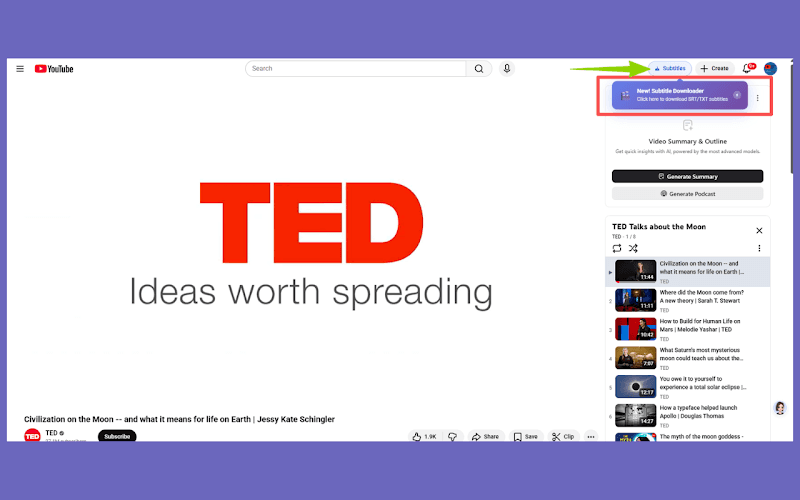
Subtitle downloads help with study notes, content analysis, multilingual research, and AI/LLM training data preparation.
The extension downloads SRT, VTT, and clean TXT on YouTube pages, with fast one-click export and playlist-friendly bulk workflows.
1) Install the extension. 2) Open a YouTube video and click Download Subtitle to export the format you need.
Three steps, no extra dashboard. Install once and keep your subtitle flow inside the YouTube player experience.

Add YTVidHub from the Chrome Web Store once, then keep it enabled in your browser.
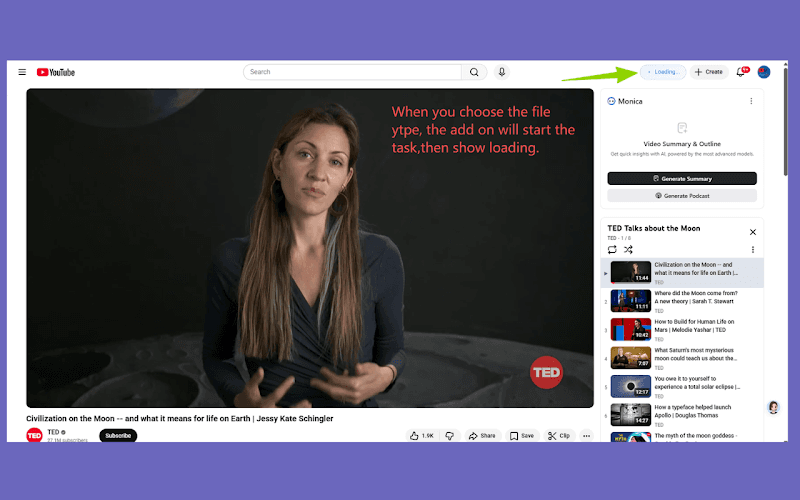
When a YouTube page loads, YTVidHub detects subtitle tracks automatically.
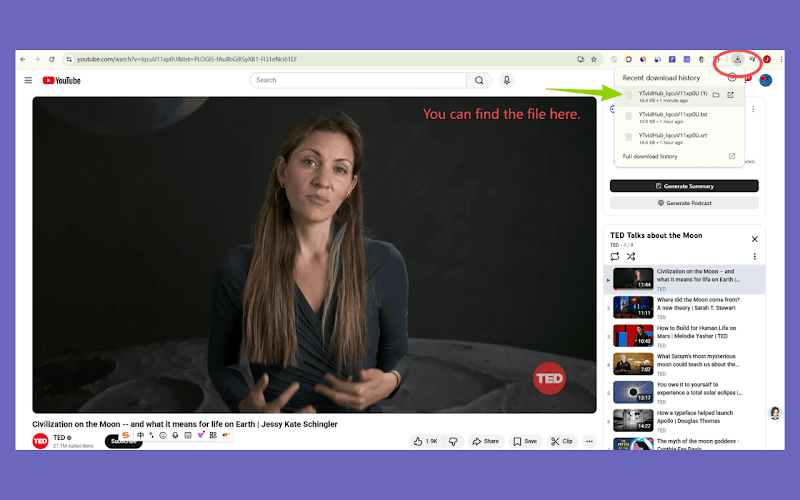
Download SRT, VTT, or clean TXT instantly without switching tabs.
Built for speed and clarity: practical controls, stable export formats, and minimal setup friction.
A clean download entry is placed directly where subtitle actions happen.
Use SRT, VTT, and clean TXT for publishing, analysis, or LLM workflows.
Supports manual, auto-generated, and translated subtitle tracks.
Works with playlist workflows and keeps bulk subtitle collection simple.
Runs on YouTube pages only and does not track browsing across websites.
Use the same extension on Chrome, Edge, Brave, Arc, and similar browsers.
Convert long videos into searchable text for revision notes and quick study summaries.
Extract subtitle datasets from video libraries for topic clustering and qualitative analysis.
Export clean TXT files for transcript corpora, retrieval pipelines, and model training data preparation.
Collect multilingual subtitle tracks for translation, localization, and global content operations.
Explore more extensions on /add-on/ including the YouTube Transcript Generator extension, or visit the YTVidHub homepage.
Install the extension and keep your existing YTVidHub workflow while reducing click steps on every video.
Install Now