 YTVidHub
YouTube Transcript Generator
* Typical speed when a transcript track is available on the video.
Use this free online YouTube transcript generator for basic use when you need export-ready text. Generate transcript from YouTube video into clean TXT for notes and AI workflows, or keep timestamps for SRT and VTT subtitle work.
By YTVidHub Editorial Team | Last updated July 8, 2026
Quick answer: use this page when you need a YouTube transcript you can actually export and reuse. YTVidHub works as a free online YouTube transcript generator for basic use and helps you generate transcript from YouTube video into readable TXT, SRT, VTT, or JSON so you can move from watching to writing, editing, or analysis faster.
Generate a reusable YouTube transcript, not just a copied transcript panel
This page works best when you need export-ready transcript text with a clear next use: reading, note-taking, AI workflows, subtitle editing, or structured archive work. The goal is to move from URL to usable output with less cleanup.
YouTube Transcript Formats: TXT, SRT, VTT, JSON
The page should feel useful before it feels long. Start by deciding the export format you need, then check what type of transcript track is actually available on the video.
Which format should you export?
If your search intent is generate YouTube transcript, the real choice is usually between plain reading text, subtitle timing, or structured data.
Transcript vs subtitle vs caption
Transcript
Best for reading, note-taking, summarization, and moving spoken content into documents.
Subtitle
Best when you need timing for playback, editing, translation, or caption file delivery.
Caption
Often similar to subtitles, but may include non-speech cues such as music or sound effects.
What kind of YouTube transcript will you get?
Transcript quality depends on the source track first. That is why two pages both claiming to be a YouTube transcript generator can behave very differently on the same video.
Creator-uploaded captions
Best when you need the most reliable wording, speaker intent, or finalized subtitle timing.
YouTube auto-generated captions
Useful for many public videos, but quality can drop with noisy audio, heavy accents, or rapid speech.
Auto-translated tracks
Helpful for discovery and quick reading, but not ideal when you need quote-level precision.
Videos with no transcript track
If YouTube does not expose a caption track, download results depend on transcript availability for that video.
Language-specific workflows can still work here. If the video exposes Arabic or Hindi transcript tracks, this page can use those tracks without changing the overall export flow.
How to generate transcript from YouTube video
Keep the flow close to the input box and close to the action. This section mirrors the homepage rhythm instead of breaking the experience into more isolated cards.
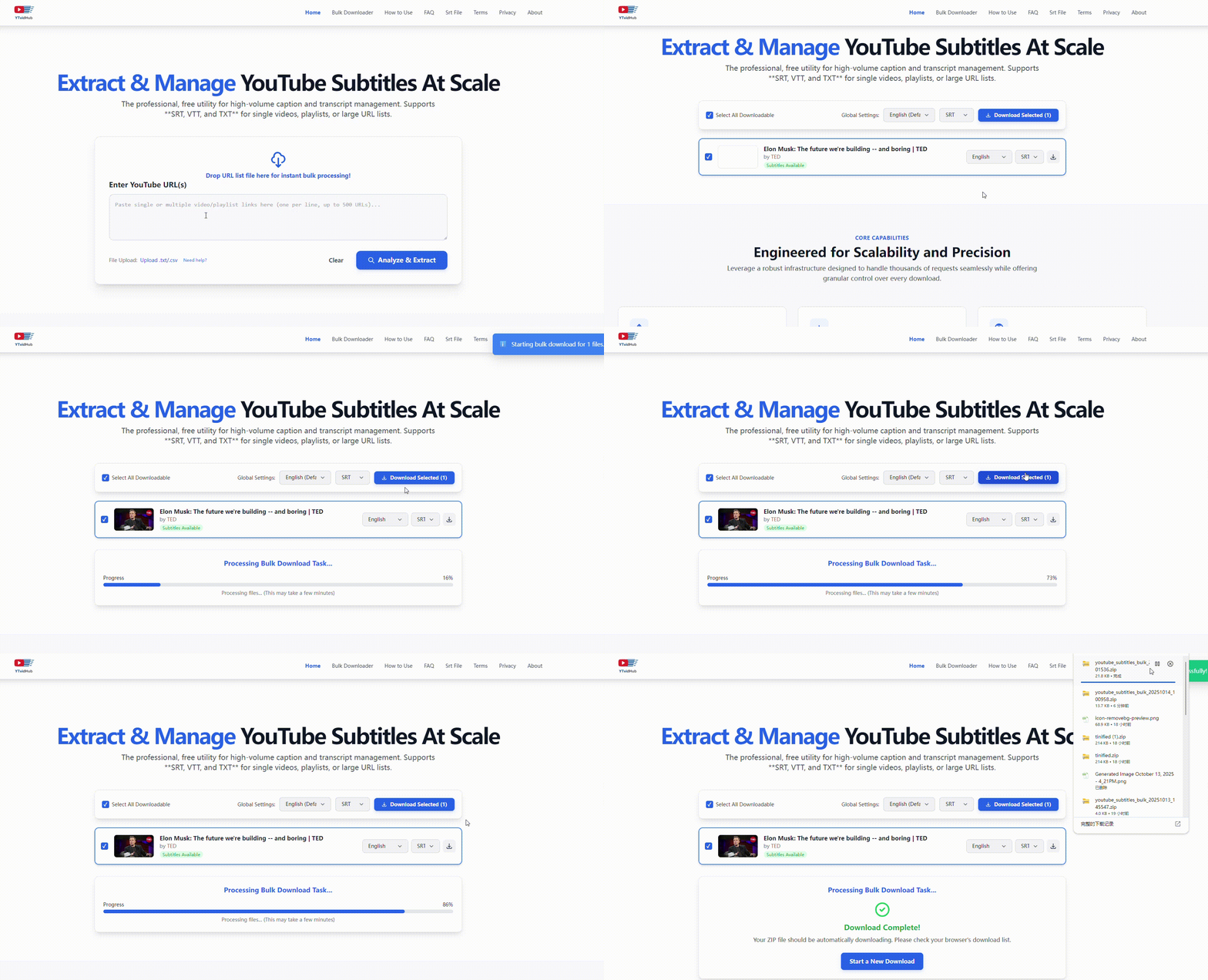
Paste the YouTube video URL
Drop in a public YouTube video link and open the transcript workflow without extra setup.
Choose language and export format
Select the available language track, then export as TXT, SRT, VTT, or JSON based on your workflow.
Download clean text or timestamped subtitles
Use TXT for reading and AI tools, or keep timestamps when you need subtitle editing and QA.
Why Use a Transcript Generator Instead of Copy-Paste?
The page should explain why the workflow is different, not just say it is better. Comparison and quality notes now sit in one visual block instead of two separate card-heavy sections.
| Feature | YouTube panel | YTVidHub | Basic tools |
|---|---|---|---|
| Best use case | One-off reading inside YouTube | Export and reuse transcript files | Single-file subtitle download |
| Output options | Copy from transcript panel | TXT, SRT, VTT, JSON | Usually subtitle files only |
| Clean text workflow | Manual cleanup required | Fast export for reading and notes | Varies by tool |
| Repeated work | Slow for repeated jobs | Better for recurring research or content work | Often optimized for basic downloads |
| When quality drops | No explanation layer | Page guidance explains transcript limits | Usually limited troubleshooting |
YouTube Transcript for AI & Research
Use cases and internal navigation work better as guided lists than as another wall of equal-weight cards.
Content repurposing
Turn interviews, tutorials, and long-form videos into blog outlines, newsletters, and clips faster.
Research and AI datasets
Archive readable transcript text before you classify, clean, or chunk it for downstream analysis.
Language learning
Compare spoken video language with readable transcript text to review vocabulary and pacing.
Subtitle editing
Keep timestamps in SRT or VTT when you need to review timing, merge lines, or QA captions.
Lecture notes and study packs
Export clean transcript text from long videos and convert it into searchable notes or summaries.
Competitive and market analysis
Extract spoken claims from videos, compare messaging patterns, and build transcript evidence libraries.
What is a YouTube Transcript Generator?
A YouTube transcript generator extracts the spoken text from a YouTube video and converts it into a readable, exportable format. Instead of manually copying from YouTube's transcript panel, you get clean text in seconds.
Why use a YouTube transcript generator?
- Save time: No need to manually pause, copy, and clean transcript text from YouTube.
- Export formats: Get TXT for reading, SRT/VTT for subtitle editing, JSON for data pipelines.
- Clean output: Remove timestamp noise and formatting artifacts automatically.
- Multi-language: Works with any language track YouTube exposes on the video.
YouTube Transcript Generator vs Manual Transcription
YouTube Transcript Generator for Different Languages
This YouTube transcript generator works with any language track available on the video. Whether you need English, Spanish, Arabic, Hindi, or Japanese transcripts, the workflow stays the same.
English
Most common language for YouTube auto-generated captions. Highest accuracy for clear audio.
Spanish
Growing YouTube market. Auto-captions work well for clear speakers, but regional accents can reduce accuracy.
Arabic & Hindi
Available when the video exposes these transcript tracks. Quality varies by video and speaker clarity.
How to get a YouTube transcript without timestamps
By default, YouTube transcripts include timestamps like [00:00] before each line. These are useful for subtitle editing, but get in the way when you need clean readable text for notes, research, or AI prompts.
With timestamps (SRT)
1
00:00:01,000 --> 00:00:04,000
Welcome to today's session.

2
00:00:04,200 --> 00:00:08,000
We'll cover three key topics.
Without timestamps (TXT)
Welcome to today's session.
We'll cover three key topics.
→ Ready for notes, AI, and search
Three ways to get a clean transcript
- 1Export as TXT — When downloading, choose TXT format. This strips all timestamp blocks and gives you plain paragraph text.
- 2Use "Copy All" — In the workspace, the Copy All button copies the full transcript text without timestamp formatting.
- 3Use Paragraph View — Switch to Paragraph View in the workspace to read and copy transcript text in clean, readable blocks.
How to get a YouTube transcript
There are two ways to get a transcript from a YouTube video — YouTube's built-in viewer, or a dedicated transcript tool like YTVidHub that lets you download the file in any format.
YouTube built-in (read only)
- 1.Open any YouTube video
- 2.Click the three-dot ⋯ menu below the title
- 3.Select "Show transcript"
- 4.Copy-paste manually — no download option
Works for viewing only. No file export, no format options.
YTVidHub (download in seconds)
- 1.Paste the YouTube URL above
- 2.Select TXT, SRT, or VTT format
- 3.Click Extract Subtitles
- 4.Download your transcript file instantly
→ Supports playlists, channels, and bulk export
How to use a YouTube transcript with ChatGPT, Claude, or Perplexity
AI tools like ChatGPT and Claude can analyze, summarize, and answer questions about YouTube content — but they need the transcript as text input first. Here's the fastest workflow:
- 1
Get the transcript as TXT
Paste the YouTube URL above, select TXT format, and click Extract. TXT gives you clean text with no timestamp noise — exactly what AI models work best with.
- 2
Copy and paste into your AI tool
Open ChatGPT, Claude, Perplexity, or any AI tool. Paste the transcript text into the chat window.
- 3
Ask your question
Try: "Summarize this in 5 bullet points", "What are the key arguments?", "Extract all action items", or "Rewrite this as a blog post."
00:00:01,000 --> 00:00:04,000). This formatting adds noise that can confuse AI models or waste context window tokens. TXT gives you only the spoken words — cleaner input, better AI output.Frequently Asked Questions
Answers to the questions users usually have before exporting a YouTube transcript.
What does this YouTube Transcript Generator actually do?
How do I generate transcript from YouTube video?
Can I download a YouTube transcript without timestamps?
Is this a free YouTube transcript generator?
Can I export timestamped subtitles too?
Can I use it as an online YouTube transcript generator without installing anything?
What happens if a YouTube video has no transcript?
Is a transcript the same as subtitles or captions?
Which format should I use for ChatGPT or Claude?
Does this work for Arabic or Hindi YouTube transcript tracks?
Can I use this for more than one video workflow?
How do I get a transcript of a YouTube video?
Is there a free YouTube transcript generator?
How do I use a YouTube transcript with ChatGPT or Claude?
What is the shortcut to see a transcript on YouTube?
Can I download a YouTube transcript as a text file?
Need to download transcripts from a full playlist?
The transcript downloader supports bulk export from entire playlists and channels — all files in one ZIP.
Ready to export a YouTube transcript?
Start with clean transcript text when you need readable output. Keep timestamps only when your next step depends on them.