 YTVidHub
2.4M+ Downloads4.9/5 Rating8 min read100% Safe & Free
How to Download YouTube Subtitles: Complete Guide 2026
Learn how to download YouTube subtitles for free using 3 proven methods. This comprehensive guide covers everything from single videos to bulk playlist downloads with SRT, VTT, and TXT formats.
Try Our Free Subtitle DownloaderSkip the manual work · 5 free downloads daily · No registration required
Choose Your Method
| Method | Difficulty | Time | Bulk | Formats |
|---|---|---|---|---|
| YouTube Built-in | Easy | 3-5 min | × | Text only |
| YTVidHub Tool | Easy | 10-30 sec | ✓ | SRT, VTT, TXT |
| Browser Extensions | Medium | 1-2 min | Limited | Varies |
Method 2: YTVidHub Batch Subtitle Downloader
Automated bulk subtitle extraction with professional formats. The fastest way to download subtitles from any YouTube video.
10-30s
Per Video
Bulk
Downloads
SRT/VTT
TXT Formats
Free
No Registration
Batch Processing
Download subtitles from entire playlists and channels at once
Professional Formats
Export as SRT, VTT, or clean TXT files ready for any use case
Lightning Fast
Process videos in seconds, not minutes
No Software Installation
Works directly in your browser on any device
Free Daily Credits
5 free downloads daily, no credit card required
All Languages Supported
Works with any language available on YouTube
Try YTVidHub Free Now
5 free downloads daily · No registration required
Method 1: YouTube Built-in Feature
Free manual method using YouTube's native transcript feature. No tools needed.
- 1
Open the YouTube Video
Navigate to the YouTube video you want to extract subtitles from. Make sure the video has captions available (you'll see a "CC" button in the video player).
- 2
Click the Three Dots Menu
Below the video player, click on the three vertical dots (⋮) to open the menu options.
- 3
Select "Show Transcript"
From the dropdown menu, click on "Show transcript". This will open a panel on the right side displaying the video's transcript with timestamps.
- 4
Copy the Transcript
Select all the text in the transcript panel (Ctrl+A or Cmd+A), then copy it (Ctrl+C or Cmd+C).
- 5
Save and Format
Paste the transcript into a text editor. You may need to clean up the formatting and remove timestamps if desired.
Limitations of This Method
· Only works for one video at a time
· Requires manual formatting and cleanup
· No structured file formats (SRT, VTT)
· Time-consuming for multiple videos
Method 3: Browser Extensions
Third-party browser extensions for subtitle extraction. Convenient but comes with trade-offs.
- 1
Install a Browser Extension
Search for subtitle downloader extensions in your browser's extension store. Popular options include "YouTube Subtitle Downloader" extensions.
- 2
Navigate to YouTube Video
Go to the YouTube video page. The extension should add a download button or menu option to the page.
- 3
Click the Extension Button
Look for the extension's download button near the video player or in the browser toolbar.
- 4
Choose Format and Download
Select your preferred subtitle format (if available) and click download.
Important Security Considerations
· Browser extensions can access your browsing data
· Some extensions may contain malware or tracking code
· Extensions can slow down your browser performance
· May stop working when YouTube updates its interface
· Limited support for bulk downloads or advanced features
Professional Use Cases: Why Download YouTube Subtitles?
From our experience processing over 2.4 million subtitle downloads, here are the most common professional applications.
AI & Machine Learning Training
Research teams use our bulk downloader to create massive text datasets. The clean TXT format removes timestamps and formatting, making it perfect for LLM training.
Best Format: TXT · Recommended: Bulk processing
Video Production & Editing
Content creators and video editors use SRT files to add professional captions to their videos. The timestamp precision is crucial for sync accuracy.
Best Format: SRT · Recommended: Single video downloads
Accessibility & Compliance
Organizations download subtitles to ensure their video content meets accessibility standards (WCAG 2.1). VTT format works best for web players.
Best Format: VTT · Recommended: Quality over quantity
Subtitle Download Trends
68%
Use TXT for AI training
24%
Prefer SRT for editing
8%
Choose VTT for web
89%
Need bulk processing
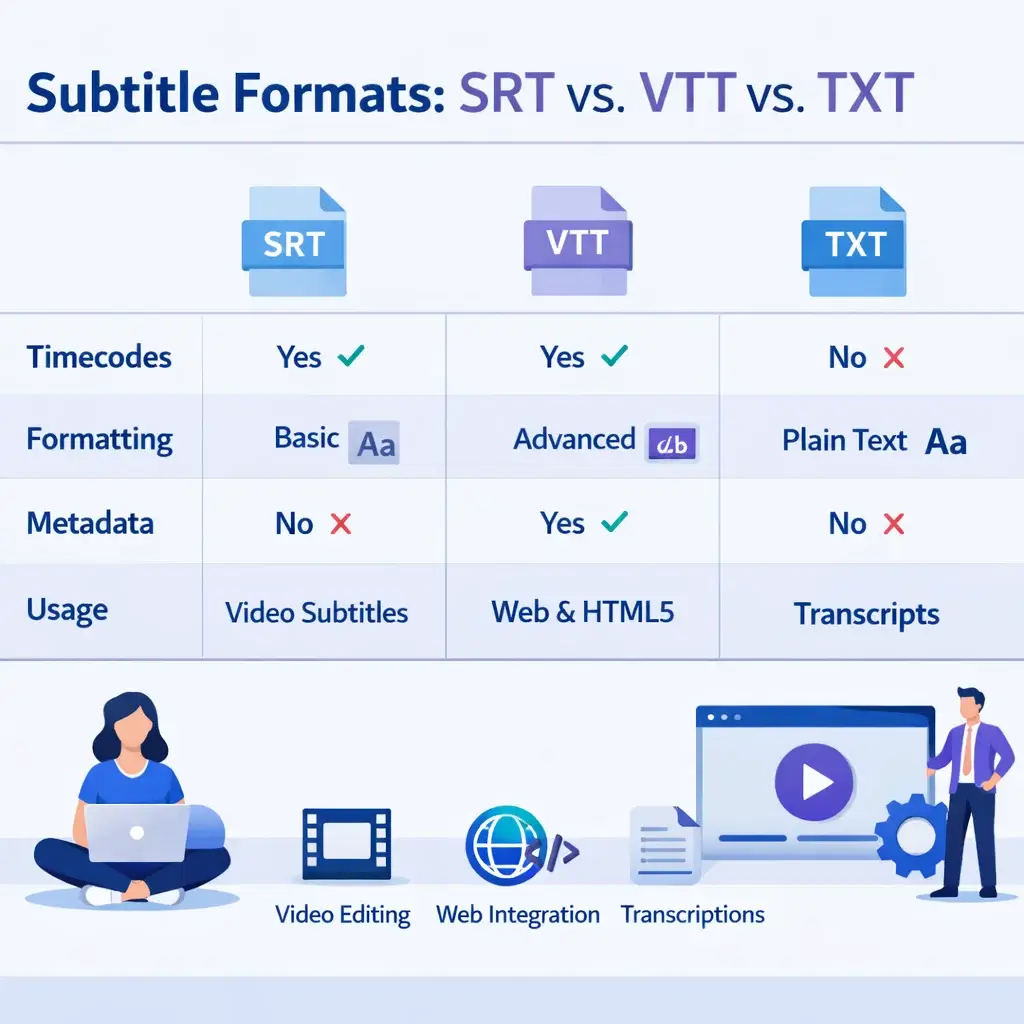
Understanding Subtitle Formats
SRT Format
The most popular subtitle format, supported by virtually all video players and editing software.
· Universal compatibility
· Precise timestamps
· Easy to edit
VTT Format
Modern web format with advanced styling capabilities, perfect for online video players.
· Web-optimized
· Styling support
· HTML5 compatible
TXT Format
Clean plain text without timestamps, ideal for AI training and text analysis.
· Clean text only
· AI training ready
· Easy to process
Frequently Asked Questions
Can I download YouTube subtitles for free?
Yes! You can download YouTube subtitles for free using YouTube's built-in transcript feature or our YTVidHub tool. We offer 5 free downloads daily with no registration required.
What subtitle formats can I download?
Our tool supports SRT (SubRip), VTT (WebVTT), and clean TXT formats. SRT is perfect for video editing, VTT for web players, and TXT for AI training and text analysis.
Can I batch download subtitles from YouTube playlists?
Yes! Our batch YouTube subtitle downloader can extract subtitles from entire playlists and channels at once. This is perfect for creating large datasets for AI training or research projects.
Does this work with different languages?
Absolutely! Our tool can download subtitles in any language available on the YouTube video, including auto-generated captions and manually uploaded subtitles.
Is it legal to download YouTube subtitles?
Yes, downloading subtitles for personal use, research, accessibility, or educational purposes is generally legal. However, always respect copyright laws and YouTube's terms of service.
Ready to Download YouTube Subtitles?
Skip the manual work and use our automated tool to download subtitles from YouTube videos, playlists, and channels in seconds.
No registration required · Instant results · Multiple formats